Before you can trade on Polymarket, you need to deposit funds. Polymarket uses USDC — a stablecoin pegged to the US dollar — for all trading. You can deposit in several ways, but transferring crypto is the cheapest option.
This guide walks through every deposit method with screenshots.
Deposit Methods at a Glance
| Method | Best For | Fees | Speed | Minimum |
|---|---|---|---|---|
| Transfer Crypto | Lowest fees, experienced users | Gas fees only | Instant | $3 (most chains) |
| Connect Coinbase | Easy for beginners with Coinbase | Low | ~2 min | No limit |
| Use Cash (Card/Pay) | No crypto at all | Higher fees | Instant | No limit |
Our recommendation: If you already have crypto, transfer it directly. If you’re new to crypto, connect Coinbase. Only use the card/pay options if you need to get started immediately and don’t mind paying higher fees.
Before You Start
You need a Polymarket account. If you haven’t signed up yet, create your free account in under 2 minutes — see our How to Sign Up for Polymarket guide.
How to Open the Deposit Modal
Step 1. Log in to Polymarket.
Step 2. Click Deposit (top right of the screen).
You’ll see the deposit modal with two tabs: Use Crypto and Use Cash.
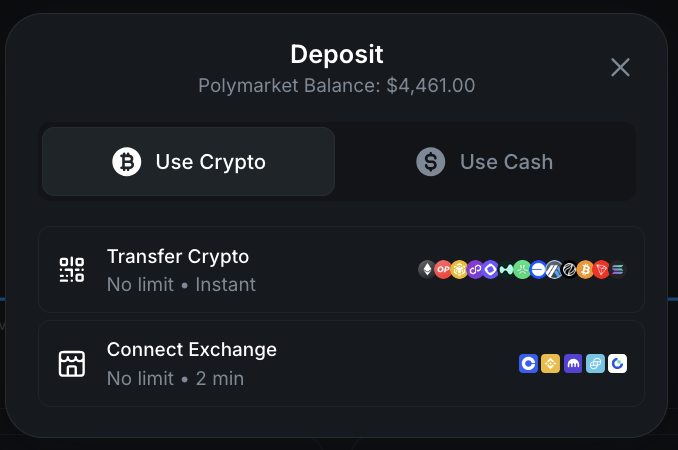
Method 1: Transfer Crypto (Recommended)
This is the cheapest way to deposit. You send crypto from any wallet or exchange to your Polymarket deposit address.
Step 1. In the deposit modal, make sure Use Crypto is selected, then tap Transfer Crypto.
Step 2. Select your token and chain.
- Token: USDC is the default and best option (no conversion needed). You can also send any of the 22 supported tokens — they’ll be automatically converted to USDC.
- Chain: Choose the blockchain you’re sending from. Polygon is the default.
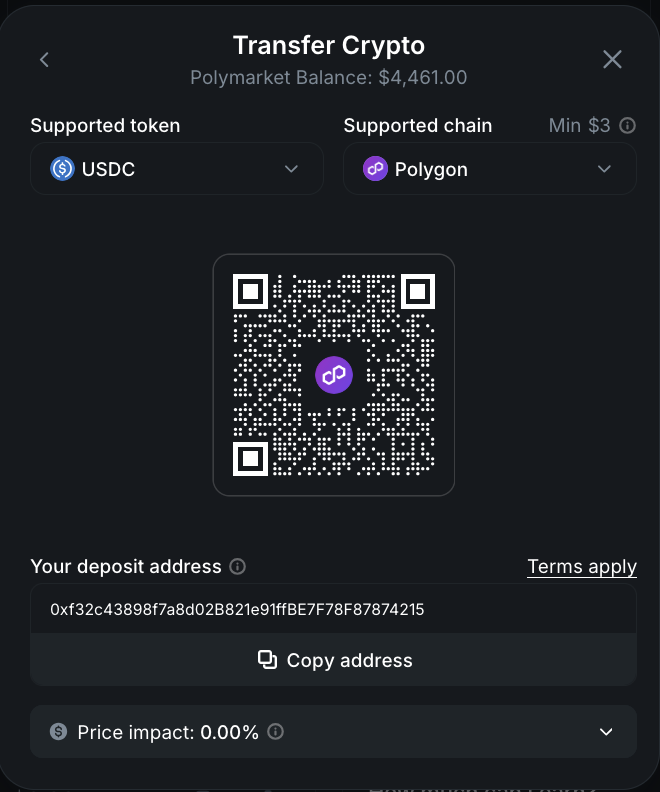
Step 3. Copy your deposit address or scan the QR code.
Step 4. Go to your wallet or exchange and send crypto to that address on the correct chain.
Important: Always double-check that you’re sending on the correct chain. Sending tokens on the wrong chain can result in lost funds.
Step 5. Your balance updates once the transaction confirms on the blockchain — usually within seconds to a few minutes depending on the chain.
Supported Tokens (22)
USDC, USDC.e, ARB, BNB, BTC, BTCB, BUSD, CBBTC, DAI, ETH, HYPE, MATIC, MON, POL, SOL, TRUMP, U, UBTC, USDE, USDT, WBNB, WETH
Any non-USDC token is automatically converted to USDC at market rate when deposited.
Supported Chains and Minimums
| Chain | Minimum Deposit |
|---|---|
| Ethereum | $10 |
| Solana | $3 |
| BSC | $3 |
| Base | $3 |
| Polygon | $3 |
| Arbitrum | $3 |
| Tron | $3 |
| Bitcoin | $3 |
| Optimism | $3 |
| Monad | $3 |
| HyperEVM | $3 |
| Abstract | $3 |
| Ethereal | $3 |
Which chain should you use? For the best balance of low gas fees and fast confirmations, we recommend Polygon, Base, or Arbitrum. Ethereum works but has higher gas fees and a $10 minimum.
Method 2: Connect Coinbase
If you have a Coinbase account, this is the easiest path for beginners. No need to copy addresses or worry about chains.
Step 1. In the deposit modal under Use Crypto, tap Connect Exchange.
Step 2. Polymarket uses a secure third party (Fun.xyz) to connect to your Coinbase account. Your credentials are never stored, and 2FA is required for every transfer.
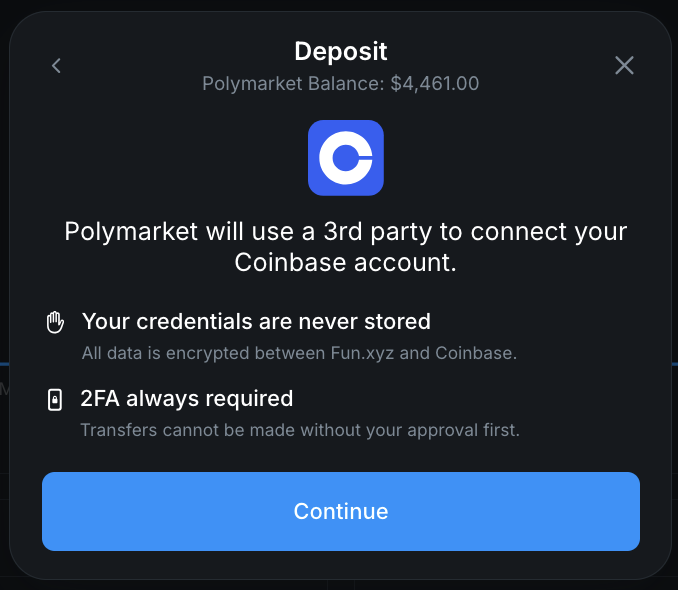
Step 3. Click Continue and authorize the connection through Coinbase.
Step 4. Choose the amount and confirm the transfer. Funds arrive in approximately 2 minutes.
This method has no deposit limit and low fees. Binance, Kraken, Gemini, and Gate integrations are coming soon.
Method 3: Use Cash (Card, Apple Pay, Google Pay, Revolut)
If you don’t have any crypto and want to start immediately, Polymarket offers cash on-ramp options.
Step 1. In the deposit modal, click the Use Cash tab.
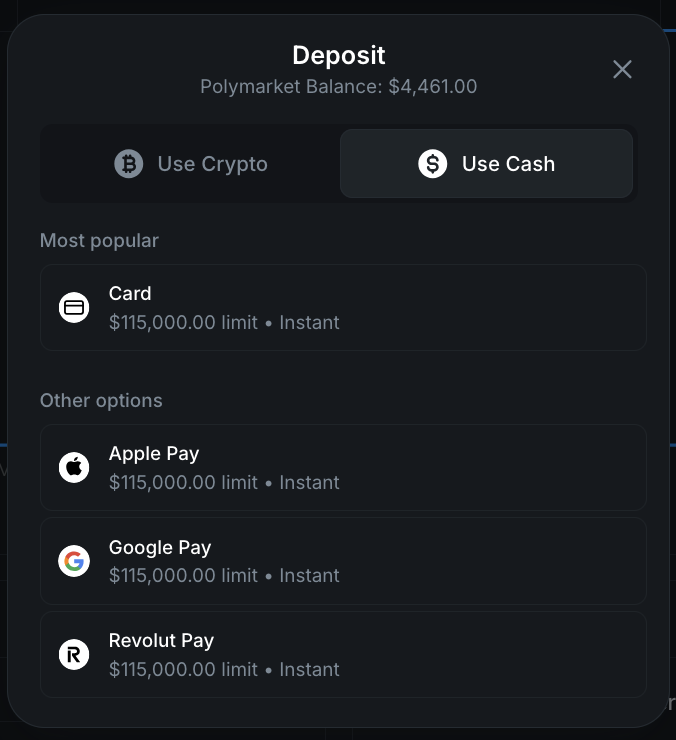
Step 2. Choose your payment method:
- Card — Credit or debit card ($115,000 limit, instant)
- Apple Pay — ($115,000 limit, instant)
- Google Pay — ($115,000 limit, instant)
- Revolut Pay — ($115,000 limit, instant)
Step 3. Enter the amount and complete payment.
Note on fees: The cash on-ramp options have significantly higher processing fees than transferring crypto directly. These fees are charged by the third-party payment processor, not Polymarket. If you plan to trade regularly, we strongly recommend buying crypto on an exchange like Coinbase and transferring it instead — you’ll save considerably on fees over time.
Which Deposit Method Should You Choose?
You already have crypto
Transfer Crypto — Send USDC (or any supported token) directly to your Polymarket deposit address. This is the cheapest option with near-instant deposits.
You have a Coinbase account
Connect Coinbase — The most beginner-friendly option. Secure, no deposit limit, and takes about 2 minutes. No need to handle wallet addresses manually.
You don’t have any crypto
Option A (recommended): Create a Coinbase account, buy USDC, then use Connect Coinbase to deposit. This takes a bit more upfront time but saves you money on fees for every future deposit.
Option B (fast but expensive): Use the Card / Apple Pay / Google Pay cash on-ramp for an instant deposit. Quick to get started, but the higher fees add up if you deposit frequently.
After You Deposit
Once your USDC balance appears in Polymarket:
- Browse markets — Explore politics, sports, crypto, finance, and more
- Place your first trade — Buy Yes or No shares on any market. You can start with as little as $1 per trade
- Learn the basics — Read our How to Trade on Polymarket guide
Tips for Depositing
- Use USDC when possible — Depositing USDC avoids any conversion spread. Other tokens work but incur a small conversion fee.
- Check gas fees before sending — Ethereum gas fees can be $5-20+ during congestion. Polygon, Base, and Arbitrum are much cheaper.
- Double-check the chain — Make sure your wallet is set to the same chain you selected in Polymarket. Sending on the wrong chain can result in lost funds.
- Start small — Your first deposit can be as little as $3. Test the process before committing larger amounts.
- Save your deposit address — Your Polymarket deposit address stays the same, so you can bookmark it for future deposits.
- Understand the fees — Polymarket charges low trading fees that vary by market category. Use our fee calculator to estimate costs before you trade.
Related Guides
- All Polymarket Guides — Browse every tutorial
- How to Withdraw from Polymarket — Cash out your winnings
- How to Trade on Polymarket — Place your first trade after depositing
- Polymarket Fees Explained — Understand fees on deposits, trades, and withdrawals
- Is Polymarket Available in Your Country? — Check access and local deposit methods
- Polymarket Review 2026 — Full platform overview