Polymarket withdrawal facts: withdrawals are near-instant (typically seconds) with no withdrawal fee. If your balance shows “Available soon,” winnings usually unlock about 2 hours after a market resolves — or you can sell winning shares at ~$0.999 for instant liquidity.
Withdrawing funds from Polymarket is straightforward — choose your chain and token, enter a wallet address, and your funds arrive in seconds.
How to Withdraw
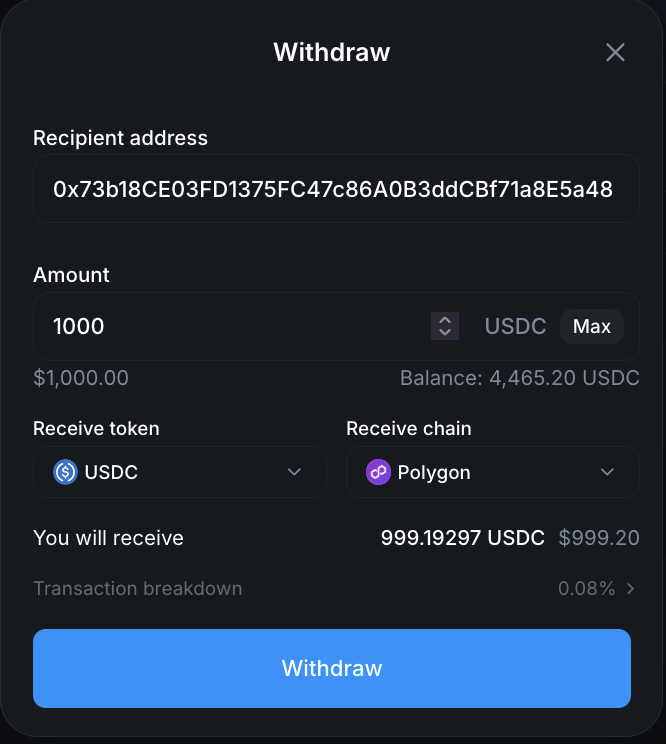
Step 1. Log in to Polymarket and click Withdraw (on the portfolio page or top navigation).
Step 2. Enter the Recipient address — the wallet address where you want to receive your funds. This can be any compatible crypto wallet, not just the one you signed up with.
Step 3. Enter the Amount to withdraw from your pUSD trading balance. Click Max to withdraw everything available.
Step 4. Select your Receive token (USDC is the default — your pUSD converts to whichever token you pick) and Receive chain (Polygon is the default).
Step 5. Review the “You will receive” amount and the transaction breakdown, then click Withdraw.
That’s it. Withdrawals are near-instant — your funds typically arrive within a few seconds.
How Long Do Polymarket Withdrawals Take?
Seconds. Once you confirm a withdrawal, funds typically land in the destination wallet within a few seconds on Polygon, Arbitrum, or Base — Ethereum mainnet can take a few minutes. In three years of withdrawing from Polymarket, including larger amounts, I’ve never had one take meaningfully longer. There’s no pending review, no processing queue, and no business-days delay: a withdrawal is an on-chain transaction, so it settles as fast as the destination chain confirms.
If money you can see in your account won’t withdraw, it’s almost always one of two things:
- It’s tied up in open positions — only your “Available to trade” balance can be withdrawn
- It’s from a market that just resolved and shows as “Available soon” — covered next
Why Your Balance Says “Available Soon”
Winnings from a market that just ended aren’t instantly withdrawable. When a market closes, someone proposes the outcome to the resolution oracle — this usually happens within minutes — and then a 2-hour dispute window must pass before the market formally resolves and winnings can be redeemed. In practice, that means for a sports market you can withdraw your winnings about 2 hours after the game ends.
Two ways to get your money sooner (or unstick it):
- Sell instead of waiting. You can sell winning shares into the market at any time — once the outcome is known, they trade at roughly $0.999 on the dollar. You give up about 0.1% to skip the ~2-hour wait.
- Check you’ve actually redeemed. Unless you have auto-redeem enabled (Settings → Trading), winning shares must be redeemed manually from your portfolio or the market page before the balance becomes withdrawable.
For the full resolution timeline — proposals, disputes, and redemption — see How Polymarket Markets Resolve.
Understanding the Transaction Breakdown
In the screenshot above, withdrawing 1,000 pUSD with USDC selected as the receive token results in receiving 999.19 USDC — a 0.08% slippage on the conversion. This is typical:
- No withdrawal fee from Polymarket
- Small conversion slippage — usually around 0.08%, depending on the amount and network
- Gas fees on the receiving chain are standard blockchain fees (very low on Polygon, higher on Ethereum)
For most withdrawals, the total cost is well under $1.
Which Chain Should You Use?
| Chain | Speed | Gas Fees | Best For |
|---|---|---|---|
| Polygon | Seconds | Very low | Default choice, cheapest option |
| Arbitrum | Seconds | Low | If your wallet is on Arbitrum |
| Base | Seconds | Low | If your wallet is on Base |
| Ethereum | Minutes | Higher | If you need funds on Ethereum mainnet |
Recommendation: Withdraw to Polygon unless you have a specific reason to use another chain. It’s the fastest and cheapest option.
Can You Withdraw to a Bank Account?
Not directly — Polymarket pays out to a crypto wallet, and you convert to fiat yourself. There is no bank-account withdrawal option inside Polymarket. The route to cash is three steps:
- Withdraw USDC from Polymarket to your account on a crypto exchange (Coinbase, Binance, Kraken, etc.)
- Sell USDC for your local currency on that exchange
- Transfer the fiat from the exchange to your bank account
If you deposited via the Coinbase connection, withdrawing back to Coinbase and selling there is the simplest path.
Budget for two sets of costs on the way out: Polymarket’s side is close to free (no withdrawal fee, roughly 0.08% conversion slippage, plus gas on the receiving chain), and your exchange will charge its own trading fee and any withdrawal or transfer fee when it sends fiat to your bank.
Can You Withdraw to a Card, PayPal or Apple Pay?
No. Polymarket has no card, PayPal or Apple Pay withdrawal route. Withdrawals go to a crypto wallet address and nothing else — the destination is set per withdrawal, so there is no saved payout method to choose.
Card, Apple Pay, Google Pay and Revolut Pay do appear on Polymarket, but on the deposit side, as “Use Cash” on-ramps. Those are one-directional and carry noticeably higher fees than transferring crypto, which is why this site advises against using them as a funding route if you already hold crypto.
To reach a card balance or PayPal, withdraw USDC to an exchange that supports those rails, sell there, and cash out from the exchange. The exchange becomes your off-ramp; Polymarket itself is not one.
Withdrawing pUSD directly. You can skip the USDC conversion and withdraw pUSD. Not every exchange accepts it, so check your destination first — withdrawing pUSD avoids the conversion slippage but can leave you holding a token your exchange will not credit.
Tips
- Withdraw to Polygon for the lowest fees — unless your destination wallet is on a different chain
- Double-check the wallet address — crypto transactions are irreversible. Always verify the recipient address before confirming.
- Available balance only — You can only withdraw funds not currently in open positions. Close positions first if you want to withdraw that capital.
- No limits or lockups — There are no withdrawal limits, cooldown periods, or lockup requirements on Polymarket.
Related Guides
- All Polymarket Guides — Browse every tutorial
- How to Sign Up for Polymarket — Create your account in under 2 minutes
- How to Deposit on Polymarket — Fund your account
- How to Trade on Polymarket — Place your first trade
- How to Sell on Polymarket — Exit positions before withdrawing
- Polymarket Fee Calculator — Taker rates by category, plus the fee formula and worked examples
- How Does Polymarket Work? — Full platform overview
- Polymarket vs Kalshi — How Polymarket compares to its main competitor
- Is Polymarket Available in Your Country? — Full list of restricted, close-only and blocked countries
- Country Availability Checker — Look up your country’s access status instantly
- Polymarket Review 2026 — Our honest review after 3 years of trading