Trading on Polymarket means buying and selling shares on the outcomes of real-world events. If you’ve ever used a stock trading app, the interface will feel familiar. If you haven’t — this guide covers everything step by step.
Prerequisites: You need a Polymarket account with funds deposited. If you haven’t done that yet:
- How to Sign Up for Polymarket — under 2 minutes, no KYC
- How to Deposit on Polymarket — fund your account
Step 1: Find a Market
Browse Polymarket’s homepage or use the search bar to find a market. Markets are organized by category — politics, sports, crypto, finance, economics, culture, weather, and tech.
Each market is a question with defined outcomes. For example:
- “Nuggets vs Suns” → Two outcomes: DEN (Nuggets win) or PHX (Suns win)
- “Will the Fed cut rates in June?” → Two outcomes: Yes or No
Click on any market to open the trading page.
Step 2: Understand the Trading Page
When you open a market, you’ll see three key elements:
The Order Book
The order book shows all open buy and sell orders at each price level.
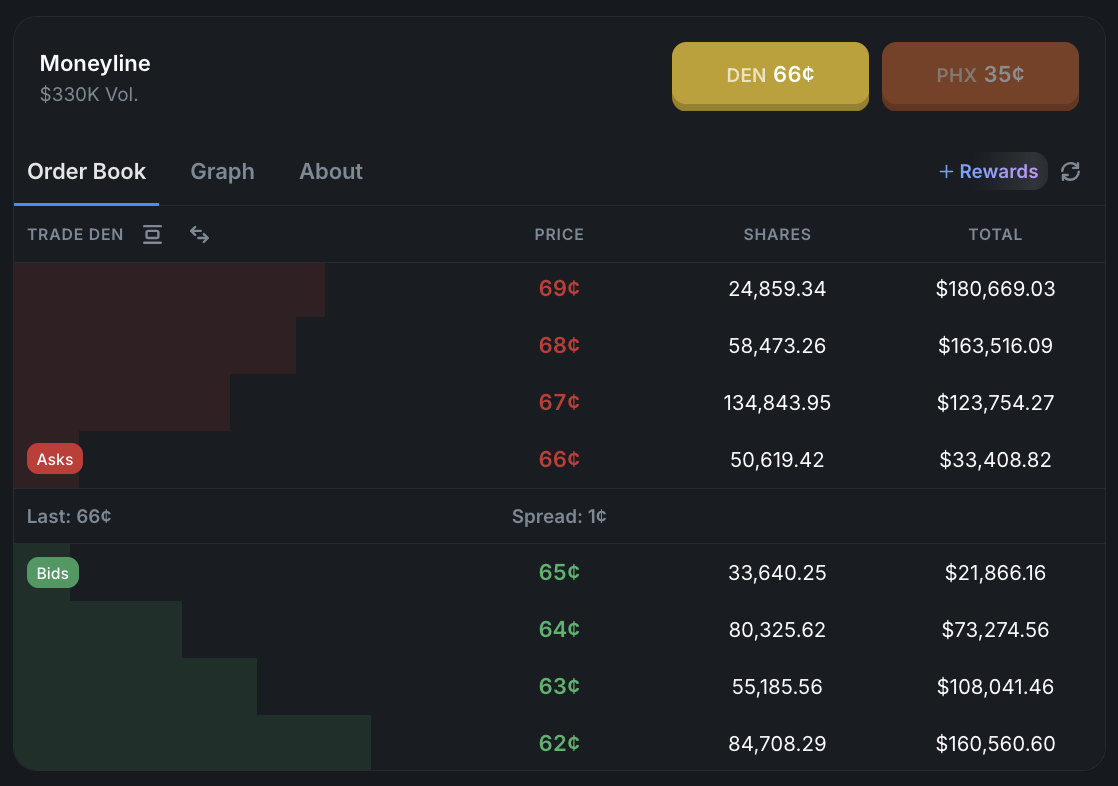
- Buy orders (bids) — What other traders are willing to pay
- Sell orders (asks) — What sellers are asking for
- Spread — The gap between the highest bid and lowest ask. Most sports markets have just a 1 cent spread. The tighter the spread, the more liquid the market.
- Last price — The most recent trade price
The order book tells you how much liquidity is available. Large numbers at each price level mean you can trade bigger amounts without moving the price.
The Outcome Prices
Each outcome shows a price between $0.01 and $1.00 — this is the market’s estimated probability.
In the screenshot above, DEN is priced at 66¢ (66% implied probability) and PHX at 35¢ (35%). The prices don’t always add up to exactly $1.00 due to the spread.
The Order Submission Box
This is where you place your trades. You can switch between Buy and Sell, and between Market and Limit orders.
Step 3: Place a Market Order
Market orders are the simplest way to trade. They execute immediately at the best available price.
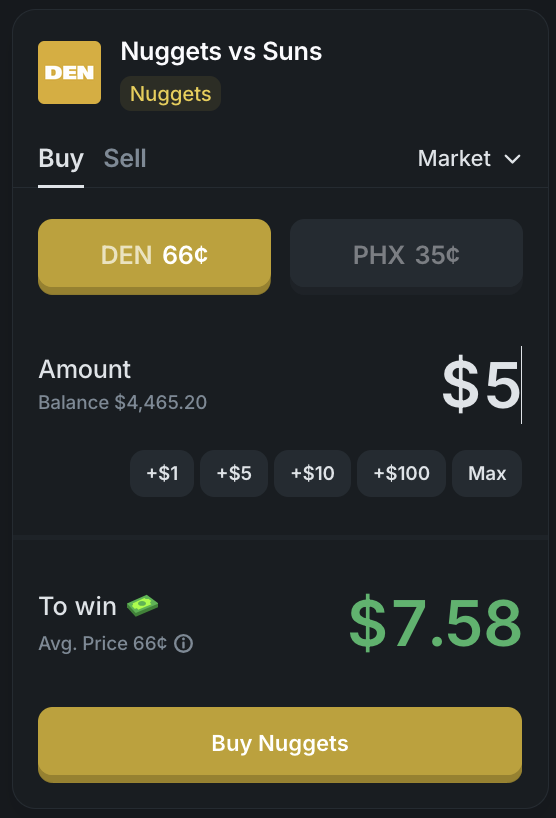
How to place a market order:
- Select Market in the order type dropdown (top right of the order box)
- Choose Buy or Sell
- Select your outcome — e.g., DEN 66¢ or PHX 35¢
- Enter the dollar amount you want to spend — use the quick buttons (+$1, +$5, +$10, +$100) or type a custom amount
- Review the “To win” field — this shows your total payout if your outcome wins. Your profit is the payout minus your cost.
- Click the Buy button to submit
Example from the screenshot: Buying $5 of DEN at 66¢ → To win $7.58 → Profit if DEN wins: $2.58
Minimum: Market orders must be at least $1.
When to use market orders:
- Quick, small trades where speed matters more than getting the perfect price
- Liquid markets with tight spreads (major politics, popular sports)
- When you’re just starting out and learning the platform
When to be careful: In illiquid markets (small sports events, markets far from resolution), market orders can fill at worse prices because there aren’t enough orders on the book. In these cases, use a limit order instead.
Step 4: Place a Limit Order (Recommended)
Limit orders give you control over the exact price you pay. They’re better for larger trades and illiquid markets.
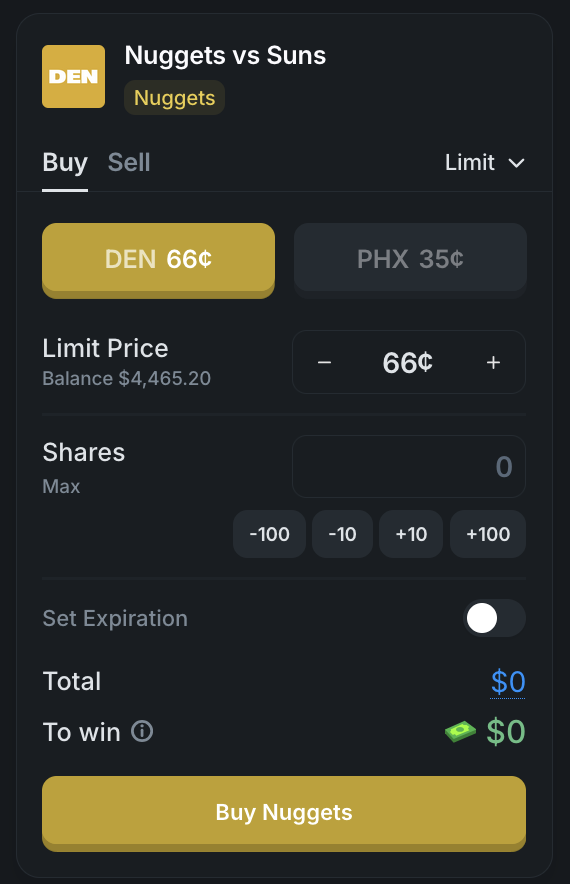
How to place a limit order:
- Select Limit in the order type dropdown
- Choose Buy or Sell
- Select your outcome
- Set your Limit Price — the maximum price you’re willing to pay (for buys) or the minimum you’ll accept (for sells). Use the +/- buttons to adjust.
- Enter the number of Shares — use the quick buttons (-100, -10, +10, +100) or type a number
- Optionally Set Expiration — by default, limit orders are good-til-cancelled. You can set them to expire after:
- 1 minute, 5 minutes, 1 hour, 12 hours, 24 hours
- End of day
- Custom date and time
- Review Total (cost) and To win (payout)
- Click the Buy button to submit
Minimum: Limit orders require at least 5 shares.
Why use limit orders:
- Better prices — You set the price, so you never pay more than you want
- Fee rebates — Limit orders that add liquidity (don’t fill immediately) qualify for maker rebates of 20-50% depending on the category
- Control in illiquid markets — Essential for markets with wide spreads where market orders could fill at bad prices
- Set and forget — Place your order at your target price and let it fill when the market moves to you
Step 5: Sell a Position
To sell shares you already own, use the same market page.
- Navigate to the market where you hold a position
- Switch from Buy to Sell in the order box
- Choose Market (sell immediately at best price) or Limit (set your minimum sell price)
- Enter the amount to sell
- Submit the order
You can sell all or part of your position. Partial sells let you take some profit while keeping exposure.
When to sell:
- Take profits — The price has moved in your favor and you want to lock in gains
- Cut losses — Your view has changed and you want to exit before losing more
- React to news — New information changes the probability and you want to reposition
- Before resolution — You don’t need to wait for the market to resolve. Selling before resolution lets you realize profit without waiting for the event.
Step 6: Monitor Your Portfolio
The portfolio page gives you a complete view of all your positions.
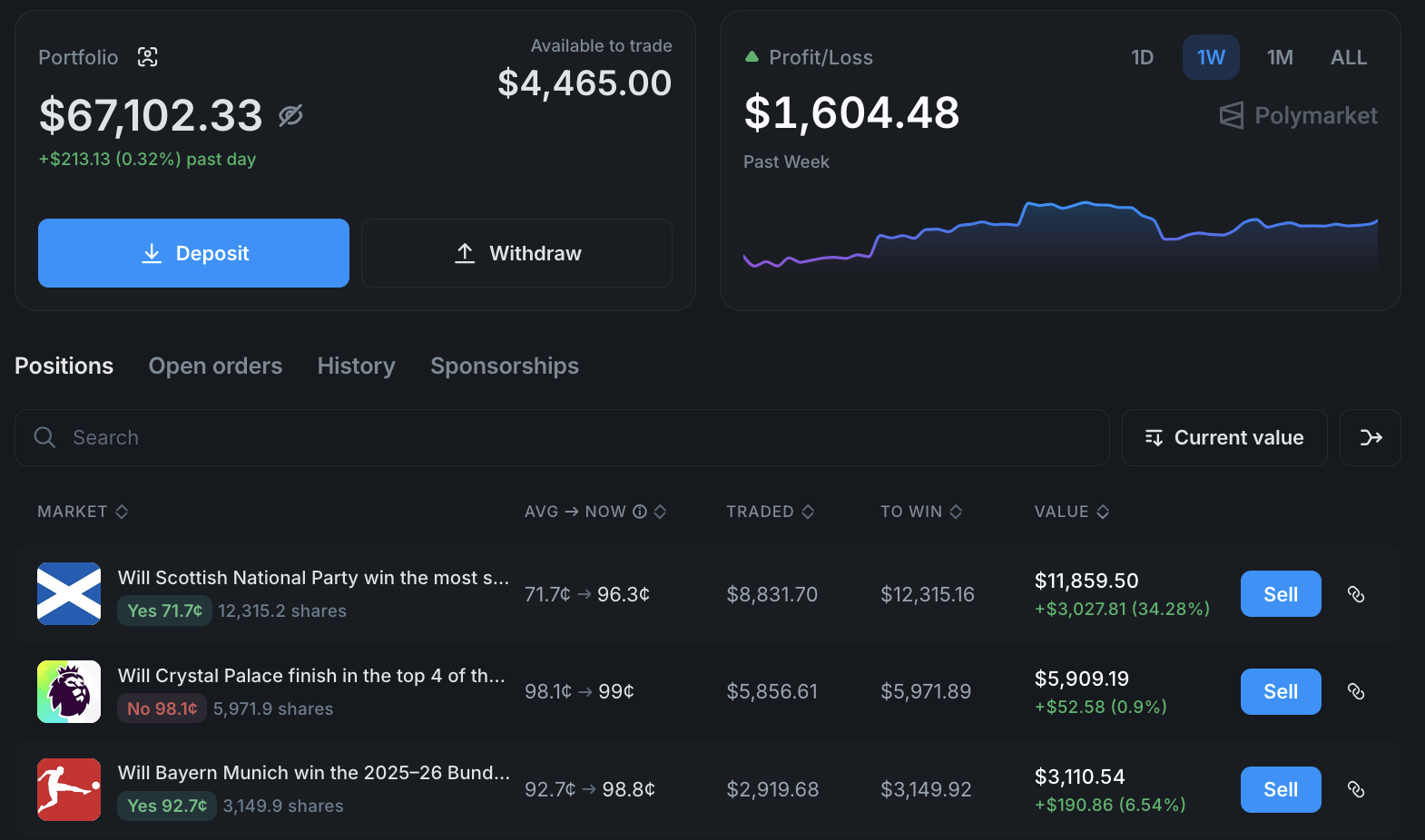
The portfolio shows:
- Total portfolio value — Mark-to-market value of all your positions
- Available to trade — Cash balance not currently in positions
- Profit/Loss chart — Track your P&L over time (1 day, 1 week, 1 month, or all time)
- Positions list — Every active position with:
- Average price you paid → Current price
- Amount traded
- Amount to win if the position resolves in your favor
- Current market value
- Profit/loss in dollars and percentage
You can also view Open Orders (pending limit orders), History (past trades), and Sponsorships.
Trading Tips from 2 Years of Experience
After trading on Polymarket across politics, sports, and geopolitics for 2 years, here are the lessons that matter most:
Use limit orders for anything meaningful
Market orders are fine for small trades in liquid markets. But for anything over $20, or in any market that isn’t heavily traded, use limit orders. You’ll get better prices and pay lower fees thanks to maker rebates.
Check liquidity before trading
Look at the order book before placing an order. If there are only a few hundred dollars at each price level, a large market order will move the price against you. In thin markets, always use limit orders and be patient.
Don’t chase markets that already moved
When breaking news hits, prices move fast. If a market has already moved 20 cents in response to news, you’ve likely missed the easy money. The remaining move is uncertain. Look for markets that haven’t fully priced in the news yet.
Think in terms of edge, not conviction
A market priced at 70¢ means the crowd thinks there’s a 70% chance. For your trade to be profitable long-term, you need to believe the true probability is meaningfully different from the market price. Ask yourself: “Do I know something the market doesn’t, or am I just following my gut?”
Manage position size
Never put a large percentage of your portfolio in a single market. Diversify across multiple markets and categories. Even high-conviction trades can lose — that’s the nature of probability.
Trade in and out — don’t just hold
The ability to sell positions before resolution is Polymarket’s biggest advantage over traditional betting. If you’re up 50% on a position and the remaining upside is small, take the profit. You can always re-enter if the price moves back.
Watch for value in less popular markets
The most popular markets (US politics, major sports) are efficiently priced because thousands of traders are watching them. Less popular markets — regional elections, niche sports, economic indicators — often have more mispricing and wider spreads, which means more opportunity for informed traders.
What Happens When a Market Resolves?
When the real-world event occurs and the outcome is determined:
- Winning shares pay out $1.00 each
- Losing shares become worth $0.00
- Your portfolio balance updates automatically
- No action is required on your part
Resolution is handled by Polymarket based on official sources (election results, sports scores, official data releases).
Next Steps
- All Polymarket Guides — Browse every tutorial
- Polymarket Fees Explained — Understand how fees work by category (use the fee calculator for exact numbers)
- How to Withdraw from Polymarket — Cash out your winnings
- How Prediction Markets Work — Deeper dive into the mechanics
- Polymarket Review 2026 — Our full platform review
- Is Polymarket Available in Your Country? — Check access for your location