Withdrawing funds from Polymarket is straightforward — choose your chain and token, enter a wallet address, and your funds arrive in seconds.
How to Withdraw
Step 1. Log in to Polymarket and click Withdraw (on the portfolio page or top navigation).
Step 2. Enter the Recipient address — the wallet address where you want to receive your funds. This can be any compatible crypto wallet, not just the one you signed up with.
Step 3. Enter the Amount in USDC. Click Max to withdraw your entire available balance.
Step 4. Select your Receive token (USDC is the default) and Receive chain (Polygon is the default).
Step 5. Review the “You will receive” amount and the transaction breakdown, then click Withdraw.
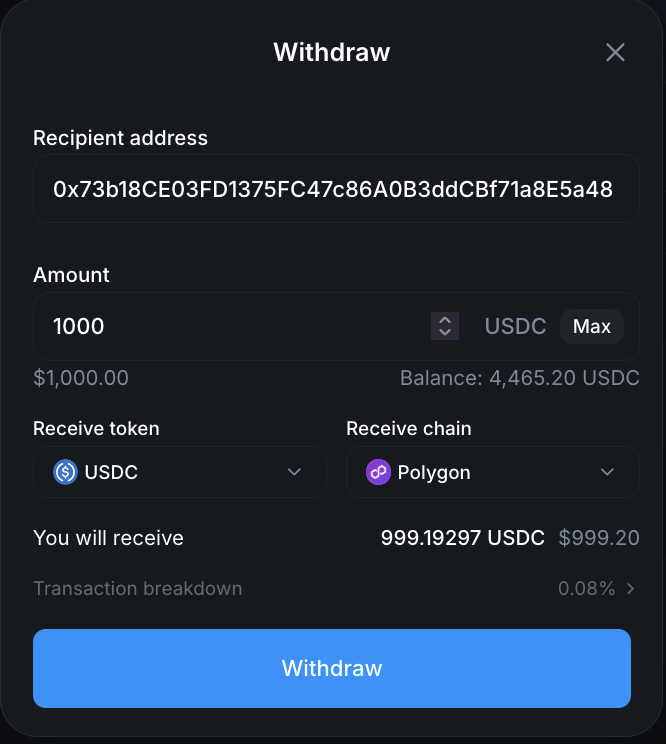
That’s it. Withdrawals are near-instant — your funds typically arrive within a few seconds.
Understanding the Transaction Breakdown
In the screenshot above, withdrawing 1,000 USDC results in receiving 999.19 USDC — a 0.08% slippage. This is typical:
- No withdrawal fee from Polymarket
- Small conversion slippage — usually around 0.08%, depending on the amount and network
- Gas fees on the receiving chain are standard blockchain fees (very low on Polygon, higher on Ethereum)
For most withdrawals, the total cost is well under $1.
Which Chain Should You Use?
| Chain | Speed | Gas Fees | Best For |
|---|---|---|---|
| Polygon | Seconds | Very low | Default choice, cheapest option |
| Arbitrum | Seconds | Low | If your wallet is on Arbitrum |
| Base | Seconds | Low | If your wallet is on Base |
| Ethereum | Minutes | Higher | If you need funds on Ethereum mainnet |
Recommendation: Withdraw to Polygon unless you have a specific reason to use another chain. It’s the fastest and cheapest option.
Converting to Cash (Fiat Currency)
Polymarket withdrawals are in crypto (USDC by default). To convert to your local currency:
- Withdraw USDC from Polymarket to your account on a crypto exchange (Coinbase, Binance, Kraken, etc.)
- Sell USDC for your local currency on the exchange
- Transfer the fiat to your bank account
If you deposited via Coinbase connect, withdrawing back to Coinbase and selling is the simplest path.
Tips
- Withdraw to Polygon for the lowest fees — unless your destination wallet is on a different chain
- Double-check the wallet address — crypto transactions are irreversible. Always verify the recipient address before confirming.
- Available balance only — You can only withdraw funds not currently in open positions. Close positions first if you want to withdraw that capital.
- No limits or lockups — There are no withdrawal limits, cooldown periods, or lockup requirements on Polymarket.
Related Guides
- All Polymarket Guides — Browse every tutorial
- How to Sign Up for Polymarket — Create your account in under 2 minutes
- How to Deposit on Polymarket — Fund your account
- How to Trade on Polymarket — Place your first trade
- Polymarket Fees Explained — Understand the fee structure (use the fee calculator for withdrawal cost estimates)
- What Is Polymarket? — Full platform overview
- Polymarket Review 2026 — Our honest review after 2 years of trading