To delete your Polymarket account, close every open position, withdraw all your funds, then go to Settings → Account and click Delete Account. The button only works once the account is empty. Deleting removes your profile and personal data, but the trades you made stay visible on the blockchain.
Want a break rather than a permanent exit? Pausing your account is the reversible option.
How to Delete Your Polymarket Account
Step 1. Close every open position. Sell anything still open (how to sell). If you hold winning shares in a market that has already resolved, redeem them; they still count as a position until you do.
Step 2. Withdraw all your funds. Send your whole balance to an outside wallet or exchange. Withdrawals land in seconds (how to withdraw).
Step 3. Open Settings → Account. Open Settings and choose the Account tab. The direct link is polymarket.com/settings?tab=account.
Step 4. Click Delete Account. Scroll to the Sensitive section at the bottom and click the red Delete Account button, then follow the prompt.
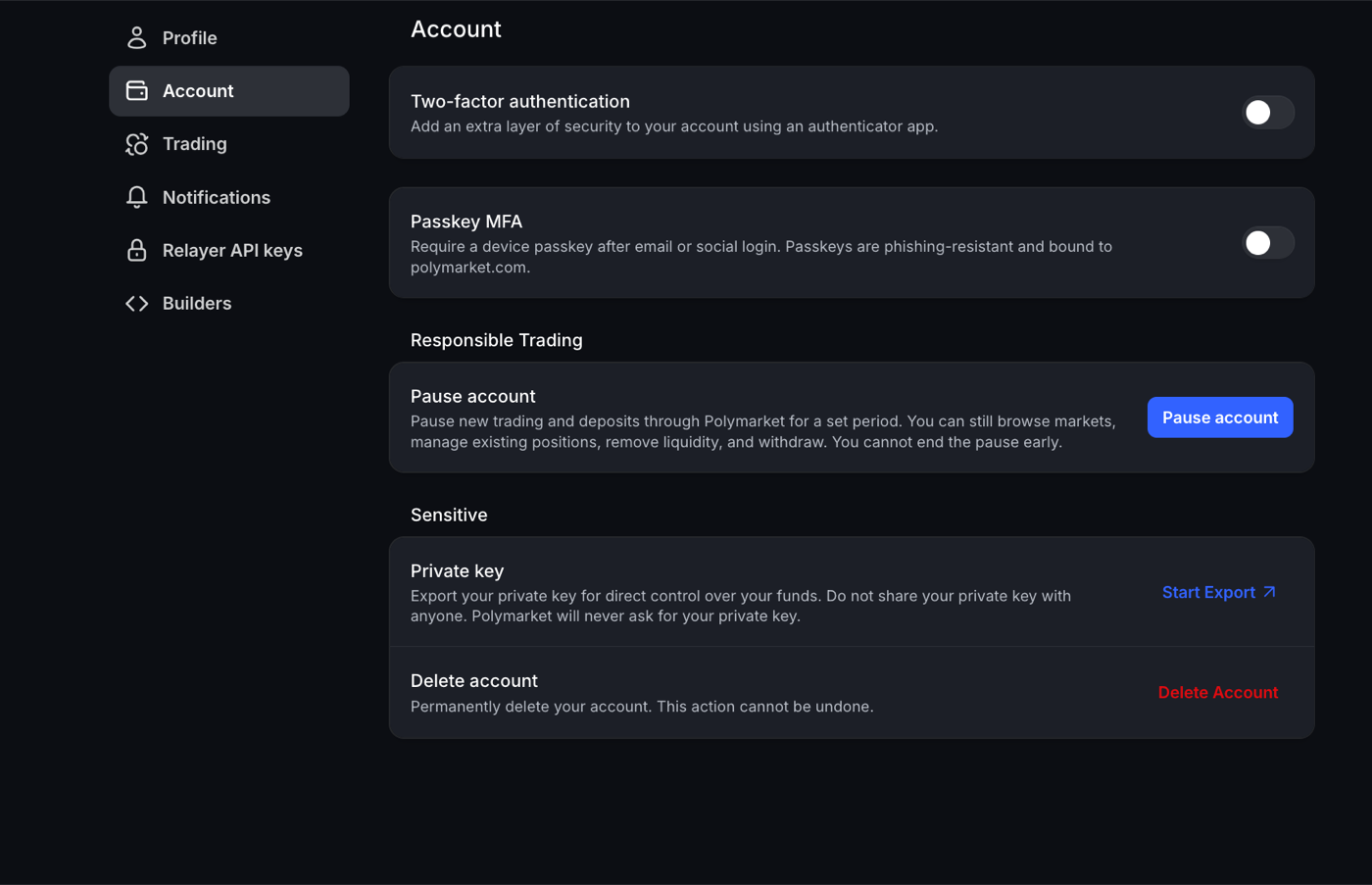
The screen warns that deletion is permanent and can’t be undone, so treat it as final.
Before You Delete: Empty the Account
Polymarket won’t delete an account that still holds positions or tokens. If you try, it prompts you to withdraw first. Check three things:
- Open positions. Your Portfolio should be empty. A market that has ended but not yet resolved still holds your shares, so wait for it to resolve (usually a couple of hours after it ends) and redeem.
- Unredeemed winnings. A balance showing “Available soon” is a resolved market waiting to settle. Once it’s redeemable, redeem it and withdraw.
- Your balance. Withdraw everything, down to the last cent.
Export your private key if you want to keep the wallet. Your Polymarket balance sits in a blockchain wallet. The same Sensitive section has Private key → Start Export, which gives you direct control of that wallet in any compatible wallet app. Do this before you delete if you might want the wallet address later. Never share the key with anyone; Polymarket will never ask for it.
What Deleting Removes and What Stays
| After deletion | |
|---|---|
| Profile, username and personal data | Removed, under Polymarket’s Privacy Policy |
| Some records | Kept where the law requires it |
| Trade history | Stays public on-chain, permanently |
Polymarket runs on a public blockchain, so every trade you made was recorded there. Deleting the account can’t erase that history, and Polymarket says so in its own help article.
Pause Your Account Instead
If you want to stop trading for a while, Settings → Account → Responsible Trading → Pause account is the gentler option:
- It pauses new trades and deposits for a period you choose.
- You can still browse markets, manage existing positions, remove liquidity and withdraw.
- You can’t end the pause early, so pick the length carefully.
Unlike deletion, your account and history come back intact when the pause ends.
Polymarket US Accounts
This guide covers polymarket.com, the international exchange. If you use the US app (Polymarket US, the CFTC-regulated exchange), it is a separate account. Empty it the same way, then contact Polymarket US support from the app to close it.
If the Delete Button Doesn’t Work
- Recheck your Portfolio for open or unredeemed positions.
- Make sure your balance is $0, not just close to it.
- Contact Polymarket through the chat on polymarket.com or at [email protected].
Related Guides
- How to Withdraw from Polymarket — Empty your balance before deleting
- How to Sell on Polymarket — Close open positions
- How Polymarket Markets Resolve — Why winnings show “Available soon”
- All Polymarket Guides — Browse every tutorial