This guide is for crypto traders who already know how a wallet works, what USDC is, and how to bridge between chains. If you’re new to all of that, start with How to Sign Up for Polymarket and How to Deposit instead — those cover the fundamentals.
For everyone else, this is the ten-minute path from zero to your first Polymarket trade.
Step 1: Sign In With Your Wallet
Go to polymarket.com and click Log In. You’ll see a few options.
Recommended for crypto-experienced users: MetaMask, or any wallet-login option. If you already have a hot wallet you trust, this is the fastest setup. You sign one message, the connection is established, and you’re done.
The other path is Google / email login, which spins up a Safe wallet for you under the hood. This is what I used myself when I signed up — it’s simpler if you don’t want to think about seed phrases — but if you’ve already got a wallet, plug it in directly. There’s no benefit to the embedded route once you have your own.
There is no KYC. No ID verification, no proof of address, no waiting on approval.
Step 2: Deposit USDC
Click Deposit in the top right. You’ll see options for transferring crypto, connecting Coinbase, or using a card / Apple Pay / Google Pay on-ramp. For a crypto-native, transferring directly is by far the cheapest.
Polymarket settles on Polygon, so depositing USDC on Polygon is the most direct route — minimum $3, fees are negligible, and there’s no bridge step on Polymarket’s end. Other supported chains include Solana, Base, Arbitrum, BSC, Optimism, Monad, HyperEVM, Lightning and Robinhood at $3, and Ethereum, Bitcoin and Tron at $10.
A note on the trading currency: Polymarket settled on pUSD — a USDC-backed ERC-20 issued by Polymarket, not a pegged stablecoin of its own design. Day-to-day this changes nothing for you — you still send USDC (or one of 100+ supported tokens), and what lands in your account is the same dollar amount in pUSD. Markets price in cents between $0.00 and $1.00 and pay out at $1.00. You can withdraw back to USDC (or any other supported token) any time.
If you don’t already hold USDC on a supported chain, the cheapest path is usually:
- Bridge or buy USDC on Polygon via your usual route (a centralised exchange, a bridge, or an aggregator like Across / Squid).
- Send to Polymarket’s deposit address.
- Confirm in the dashboard.
Most deposits clear in under a minute.
Step 3: The Mental Shift
This is the part most crypto traders underestimate. Polymarket is not a perp DEX with smaller numbers. It’s a different instrument.
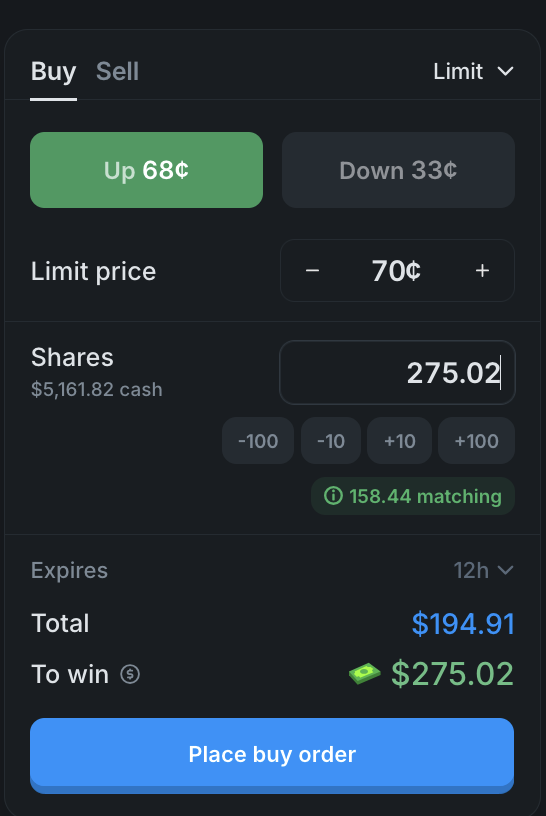
Three things to internalise before your first trade:
- The price is the probability. A share at 68¢ means the market thinks there’s roughly a 68% chance the outcome happens. You don’t need to convert from odds to percentages — they’re the same thing.
- The payout is fixed and visible. The “To win” field in the order panel shows the exact dollar amount you’ll receive if the outcome resolves in your favour. In the screenshot above: $194.91 in to win $275.02. No leverage math, no R-multiple computation.
- You can exit any time. Like closing a perp position. Sell into the order book before resolution and book the gain (or cut the loss). You don’t have to hold to expiry.
That last one is the biggest underappreciated feature. Every Polymarket market is liquid in both directions — you can trade in and out as freely as you would on a CEX.
Step 4: Place Your First Trade With 1-Tap
Polymarket recently added 1-Tap mode to the order panel. For your first trade, this is the easiest thing to use.
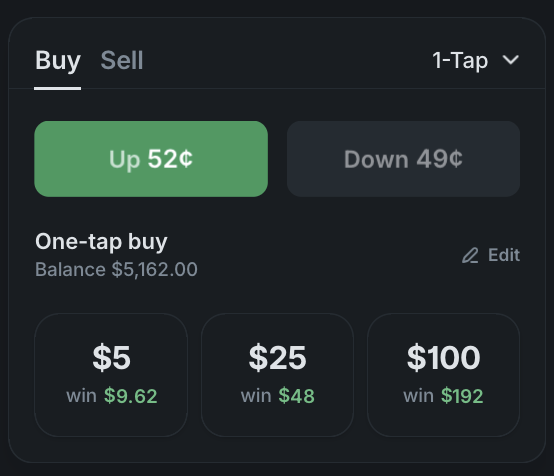
Pick a market — I’d suggest a 5-minute or 15-minute BTC market for your first one because the resolution is fast and you can see the full lifecycle in minutes — open the buy panel, and tap one of the preset sizes ($1 / $5 / $100 by default, editable to whatever you want). The payout is shown directly on each button. One tap, the order fires at the best available price.
If you want more control, switch to the Limit mode at the top right of the panel. That lets you set your exact price, choose share quantity, and set an expiration. The fee model is maker/taker, exactly like a CEX: market orders are always takers and always pay; a limit order that sits on the book and gets filled by someone else is a maker and pays zero. (A limit order priced aggressively enough to cross the spread and fill immediately is also a taker, and still pays.) Crypto is Polymarket’s highest-fee category — peak 1.75% of the payout at even odds, which is the same statement as $1.75 per 100 shares — so leaning maker-side on sized trades matters.
Sign Up and Get StartedWhere to Start as a Crypto-Native
A few suggestions based on what you already trade.
- You scalp perps: the 5-minute and 15-minute BTC markets are the closest analogue. Tight spreads, fast settlement, real volatility. The same up/down format runs on BTC, ETH, SOL, XRP, DOGE, HYPE and BNB across 5m, 15m, 1h, 4h and daily expiries.
- You hold spot and trade trends: the monthly and yearly BTC ladders let you take the same directional view with capped downside. The year-end 2026 BTC market alone holds $34.5M of volume.
- You trade narratives: ETF approval markets, the SOL/ETH flippening, regulatory and policy markets. These don’t exist on perp DEXes — Polymarket prices them directly.
- You trade macro: the Fed rates dashboard is the cleanest expression of FOMC outcomes I’ve seen anywhere.
Things That Will Surprise You
- Spreads are tighter than you’d expect for a binary contract. The flagship BTC short-horizon market shows a 1-cent spread on the order book. CEX perp books obviously quote in sub-cent ticks, so this isn’t the tightest spread in crypto in absolute terms. But for a derivative that prices between 0¢ and 100¢, a 1-cent book is the entire spread compressed inside one percentage point of implied probability — that’s exceptional for a binary-option market.
- Settlement is in pUSD. Wins land as pUSD in your trading balance (a USDC-backed ERC-20). You can withdraw back to USDC, USDT or any of the other supported tokens — withdrawals are instant and Polymarket charges no withdrawal fee.
- No funding, no margin — on these markets. The position you opened today costs the same to hold for a week, and there’s no overnight carry. That’s specific to Polymarket’s prediction markets. The platform also runs Perps, a separate leveraged product on stocks, crypto, indices and commodities with funding, margin and liquidation at up to 20x. If you actually want leverage, Perps is the venue — the BTC up/down markets here have none.
- The order book is fully visible. Every bid and ask at every price level, all sizes, all the time.
Common Gotchas
- Polygon gas. For most users this is a non-issue: Polymarket relays transactions, so the standard signup and deposit flow is gasless and you don’t need to hold MATIC. It only becomes relevant if you sign transactions directly from your own wallet rather than through the platform — in that case keep a few cents of MATIC around.
- Withdrawals to the wrong chain. Polymarket settles on Polygon. Withdraw to a Polygon address unless you specifically use the cross-chain withdrawal flow.
- Limit order minimum. Limit orders need at least 5 shares. Market and 1-Tap orders have a $1 minimum.
- Country availability. Polymarket’s international exchange is close-only in the US — existing positions can be closed, but no new ones opened — while a separate CFTC-regulated US exchange is open to US users. Close-only also applies to around 30 other countries, so check the country availability page or use the country checker rather than assuming.
Next Steps
- How to Trade Bitcoin Without Liquidation Risk — Deep dive on the BTC markets
- Polymarket vs Hyperliquid — When to use each platform
- How to Trade on Polymarket — Order types, limit orders and the order book
- Polymarket Fees Explained — How the fee model rewards limit orders
- How to Withdraw from Polymarket — Cash out back to your wallet
- Polymarket Review 2026 — Full platform review after 3+ years of trading